dimarts, 17 de juny del 2014

More of Wifi bennchmarks: CISCO MERAKI MR18

1.0 CISCO MERAKI MR18

Hem tingut la oportunitat de provar els Cisco Meraki MR18 de part del partner de Cisco Grup Sistemes Informàtics
Es tracta d'un sistema wifi gestionat des del núvol, sense controller, amb una gran potència en quan a administració remota (Meraki).

We had the opportunity to test the Cisco Meraki MR18 from the local partnet Grup Sistemes Informàtics.
It is a wifi access point managed from cloud. Controllerless when speaking of several access points. It has a very powerful management platform that lets you configure each AP from anywhere in the world mking it vey easy to manage distributed organizations.

Però nosaltres necessitem un Wifi que pugui admetre la càrrega de 500 clients en un espai de 60 metres x 4 pisos. L'administració remota és quelcom a més a més.

But we need a Wifi that can hold 500 clients in 60m x 4 floor. Remote managemet is a plus.

2.0 Test Setup

No hem pogut fer proves més extensives perquè la feina principal aquesta dies és molt elevada. Igual que en els tests anteriors, hem fer proves de download, però aquesta vegada no ens ha donat temps a fer els tests de upload. Un dels ordinadors (Toshiba NB500 Realtek 8188CE) ha estat canviat per un Toshiba L830 (Atheros AR9485).

We couldn't do more extensive tests because I have a work overhead these days. Like last benchmarking session, we benchmarked the downloads but we couldn't test the uploads. One of the computers was not available and we replaced the Toshiba NB500 with RTL8188CE with the Toshiba L830 with Atheros AR9485.

Mateixa configuració:

  • 3 ordinadors (Aspire 1830 and targeta Broadcom, NB250 amb Atheros AR9285 i Toshiba L830 amb Atheros AR9485). Windows 7 al dia d'actualitzacions.
  • 3 taules una enfront de l'AP a 3 metres, i les altres a 60 graus a la dreta i 60 graus a l'esquerra respectivament.
  • 1 AP Cisco Meraki MR18 connectat a un Switch Gigabit Cisco-Meraki.
  • 1 servidor de fitxers amb suficient ample de banda.
  • 2 fitxers AVI de vídeo que sumen 450Mb


Same setup:

  • 3 computers, (Aspire 1830 with Broadcom, NB250 with Atheros AR9285 and Toshiba L830 with Atheros AR9485) Windows 7 updated.
  • 3 desks, one 3 m in front of the AP, and 2 more, one 60º left and the other 60º right.
  • 1 AP cisco Meraki MR18 connected to a Cisco Meraki Gigabit Switch with POE.
  • A fileserver having enough bandwith/storage.
  • 2 AVI files, 450Mb total.
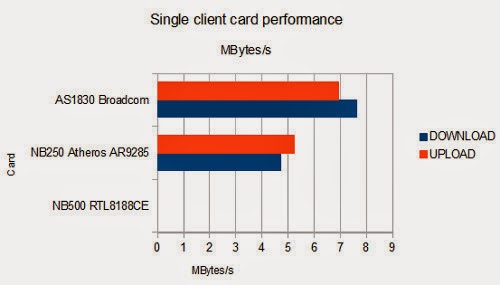
3.0 Single card performance / Velocitat de les targetes

Les targetes funcionen a diferent velocitat. Els números s'assemblen bastant als de Ruckus.

The cards have different throughput. The numbers are close to the ones I got with Ruckus.

4.0 2 Stations at the same time / 2 estacions al mateix temps.

Aquí els números comencen a baixar alarmantment. Amb prou feines 4,5Mbytes/s de total. Els Ruckus van sobrepassar els 6Mbytes/s

Here the numbers come down dangerously. Barely 4,5Mbytes/s total. Ruckus scored more than 6.


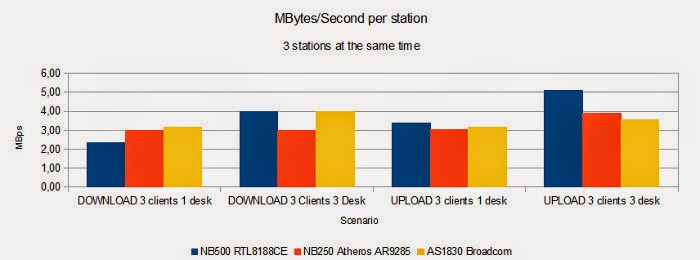
5.0 3 Clients at the same time. 3 clients al mateix temps.

No sabem si les antenes de cisco son direccionals o omni, de manera que hem mantingut les proves de fer 3 clients separats 60 graus entre ells i 3 clients junts en una taula. Els resultats no deixen de ser sorprenents.

I don't know if cisco has a special shaped aerial or is a simple omni one. We continued doing the test with 2 scenarios: 3 clients in 3 desks separated 60º left and right (120º), and 3 clients all in the same location. See the results.


Curiosament als Cisco els agrada més que tots els ordinadors estiguin junts que no pas separats. Tret de la diferència registrada a la targeta Broadcom, els altres números son semblants. Els números, en conjunt son baixos.

Surprisingly, Cisco prefers to deal with all the stations at the same desk, better than stations apart in the space. The only significant change is in the Broadcom but all them have slightly better numbers when in the same desk. Numbers are low.

6.0 Transferencia total en el canal / Total performance in the media.


Hem representat l'ús del media sumant els Mbytes/s que es transfereixen simultàniament. En el cas de clients solitaris, hem fet una mitjana dels diferents clients en solitari.

We represented the media use adding the Mbytes/second that are transferred at the same time. For the benchmarks with a single client we calculated the mean between the throughput of all single clients.

La conclusió és que aproximadament podem esperar un ample de banda de 5Mbytes/s.

The conclusion is that we can expect a media bandwith of about 5Mbytes/s.


dijous, 22 de maig del 2014

WIFI BENCHMARKS

1: Wifis d'Alta densitat. High Density wireless.

Estem tinguent alguns problemes amb el Wifi de l'escola. Els Wifis de les escoles no son instal.lacions normals. Els punts d'accés generalment no accepten més de 15 clients sense tenir fortes pèrdues de prestacions. A més a més, la tecnologia wifi limita a 3 punts d'accés en una zona de cobertura degut a les freqüències dels canals de 2,4GHz. 15 clients per 3 canals son un màxim de 45 estacions wifi, totalment insuficient per una escola plena de classes i plena d'estacions. Llavors cal anar a parar a instal.lacions tipus malla, amb controladors que permeten balancejar clients, tenir varies antenes en un sol canal, etc.

We are having some problems with the Wifi network at school. The Wifi setup in a school is not a standard Access Point. They use to allow 15 clients at most, before suffering from a severe drop-down performance. Wifi technology was developed so that 2.4GHz RF channels only allow 3 channels at a time. 15 clients per 3 channels means that a standard wifi setup allows at most 45 clients. Beyond this, there are special high density wifi setups with controllers that allow mesh Access Points, channel sharing and so.

El primer fabricant que ens ha portat material per a provar és Ruckus, gentilesa del seu Partner GlobalSIO . Tenim un Zonedirector 1000 i 3 punts d'accés Zoneflex 7372. Hem integrat els aparells a la xarxa de l'escola i hem configurat 2 SSIDs amb 2 VLANs. Encriptació WPA2/AES.

The first one that offered demo equipment to test was Ruckus from this local partner GlobalSIO. We have a Zoendirector 1000 plus 3 Zoneflex 7372. We integrated the equipment in the school network: setup 2 SSIDs with 2 VLANs. WPA2/AES encryption.

Després d'un parell de dies d'abusar dels equips (tenim 11 classes connectades a només 3 antenes) les impressions son molt bones. Indubtablement calen més antenes, doncs la cobertura és escassa, però la gent que s'hi pot connectar té una molt bona experiència. Hem connectat 3 classes (més de 60 ordinadors) mirant vídeos al Youtube i hem acabat la VDSL de 30Mbps. Tot i el trànsit, encara hi hem afegit una estació baixant 450Mb de fitxers des del servidor intern, i encara donava 1MByte/segon (8Mbps) de baixada.

After a couple of days abusing the equipment (11 classrooms sharing only 3 Access-Points), we are very satisfied with the result. Of course we need more Access Points because area coverage is poor, but all those people near the APs can connect and work very well. Some more stress test: more than 60 computers were playing youtube videos, we maxed out our 30Mbps VDSL, and then we started downloading a very large 450Mb file from a local fileserver: the downloading station averaged more than 1MBytes/s (8Mbps), sharing the wifi with all these 60 youtube leeches.

Hora de fer algunes gràfiques per a comparar. No he tingut 30 col.laboradors per a fer proves, però he agafat 3 ordinadors i he mirat a veure què podia fer. He ideat varis escenaris:

  • 3 ordinadors carregant / descarregant simultàniament en una taula (des d'un servidor local)
  • 3 ordinadors carregant / descarregant simultàniament ben separats per a comprovar si hi ha avantatge de l'antena direccional dels Ruckus.
  • 2 ordinadors carregant/descarregant simultàniament ben separats.
  • 1 sol ordinador carregant / descarregant.

Time to build some statistics. Wish I had 30 people helping me with the testing. I only had 3 computers, so I grabbed them and made some testing. I thought about several scenarios:
  • 3 computers downloading/uploading at the same time from a local fileserver.
  • 3 computers downloading/uploading at the same time but located very apart in the room so that I could take advantage of the Ruckus directional antenna.
  • 2 computers downloading / uploading at the same time located apart.
  • 1 single computer uploading/downloading from the local fileserver.


2 TEST SETUP:


  • 1 classe amb 1 punt d'accés Ruckus 7372, a la xarxa hi ha 2 punts d'accés més i un controller Zonedirector 1000. Els APs estan endollats a un Switch de 100Mbits POE.
  • 3 taules, una situada enfront de l'AP, a uns 3 metres, una altra a 60 graus a l'esquerra a uns 6 metres i l'altra a 60 graus a la dreta, a uns 60 metres.
  • 3 ordinadors: Netbook Toshiba NB250 and targeta Atheros AR9285, Netbook Toshiba NB500 amb targeta RTL8188CE i un Acer Aspire TimelineX 1830 amb una Broadcom, totes 802.11n. Els ordinadors tenen Windows 7 i estan al dia d'actualitzacions.
  • Servidor de fitxers amb suficient ample de banda per a no donar falses lectures.
  • 2 arxius de vídeo, 450Mb en total, per a copiar i retransmetre.
TEST SETUP:
  • 1 classroom having 1 Ruckus 7372 Access Point. There are 2 more APs in the network and there is also a Zonedirector1000 controller. The APs are powered by a 100Mbit POE Switch.
  • 3 desks, one in front of the AP, about 3m away, another desk about 60 degrees left, 6m away, and a third desk, 60 degrees right, 6m away.
  • 3 computers: Toshiba NB250 Netbook with an Atheros AR9285 wifi card, Toshiba NB500 with a RTL8188CE card, and an Acer Aspire TimelineX 1830 having a Broadcom card. They all are 802.11n. All the computers have Windows7 and have the current software updates installed.
  • Fileserver having enough disk/network speed so that results are not affected.
  • 2 AVI files, 450Mb total, used to copy/transfer.


3: Velocitat de les targetes. Single card Performance.


Comprovem que el rendiment de les targetes és diferent.

The cards have different performance.


Les xifres entre 4 i 8MBytes/s son entre 36 i 72Mbits

4 and 8 Mbytes/s mean 36 and 72Mbits.

4: Dues estacions al mateix temps. Performance for 2 stations at the same time.

La velocitat queda afectada quan les estacions wifi comparteixen el mitjà de transmissió.

Performance is affected when there are two stations using the same wireless media.


No hi ha gaires novetats, les gràfiques son proporcionals al rendiment que tenen cadascuna de les targetes per separat, però els números són més petits perquè estan compartint canal. Obtenim uns 50-60Mbps en total.

No news, graphics are proportional to the card performance. The numbers are lower because they are sharing the media. They sum about 50-60Mbits.


5: Tres clients al mateix temps. Three leeches at the same time.

Hem volgut comprovar si les antenes direccionals tenen algun efecte sobre la capacitat real de transmetre, així doncs, hi ha dos escenaris: 3 ordinadors en una taula i 3 ordinadors en 3 taules separades.

We wanted to check if there is any real benefit in that directional multishaped aerial that Ruckus uses in the Access Points. We have 2 scenarios: 3 computers on a desk and 3 computers in 3 desks that are located apart in the room.


Les gràfiques canten per elles soles: En els dos casos on els clients estan separats, la velocitat és netament superior, siguent la targeta RTL8188CE la que més canvia si té veïns.

Statistics are clear here: when the clients are apart one to another, they all increase in performance. The max benefit is for the clients using the RTL8188CE, that is very affected by the neighbors.

6: Transferencia total en el canal. Total performance in the media.

Cada client sembla tenir un ample de banda dedicat, doncs un client pot transmetre uns 5-6 MBytes/s, dos clients passen de 6.5MBytes/s i tres clients passen dels 12MBytes en total.

It looks like each client has a reserved bandwith. A single client reaches 5-6MBytes/s, two clients can get beyond 6.5MBytes/s, and 3 clients sum 12Mbytes in total.


La màxima transferència en aquesta prova és la obtinguda quan 3 clients estan separats i poden treure avantatge de l'antena directiva, tant en càrrega com en descàrrega de continguts.
Les cotes màximes son de més de 12MBytes/segon (uns 108Mbits) d'utilització del canal que indiquen que estem al límit del switch POE a on van connectats els APs.

We reached a max performance in this test when 3 clients were operating away one from another, so thay they could take advantage of the multishaped aerial of the Access Point. Upload and Download have benefits from this technology.
Max throughput is 12MBytes/second (108Mbits), this means that we are having a bottleneck in the POE Switch that APs are plugged to.

Actualització / Update:
La transferència del client únic ha estat representada calculant la mitjana de les transferències individuals de cada targeta en els tests de client únic. 
Single client benchmarks are represented by calculating the mean of the individual throughputs of the cards when benchmarked in single client tests.


dijous, 1 de maig del 2014

Visita al Sincrotró Alba de Bellaterra.

És un accelerador de partícules que no les col.lisiona, com el CERN, només les utilitza per a generar llum de sincrotró, que té unes característiques molt especials per a la ciència.

Is is a Particle accelerator, but not a collisioner like CERN's LHC. They accelerate electrons to get beams of synchrotron light, very special for scientific process.


 Vista de l'anella. A baix a la dreta es veu on comença el laboratori 13 "Xaloc" sobre cristalografia macromolecular.

Ring View. At the lower right part of the photo there is the Lab13 XALOC macromolecular Cristallography lab.

Laboratori 13 XALOC. Cristalografia Macrolecular. Cada cristall proteïnic té una signatura especial sota llum de sincrotró.

Lab 13 XALOC. Macromolecular Crystallography. Each protein has a particular signature under synchrotron light.

Sala de control. Semus informàtics.


Control Room. (I'm a computer scientist)

Bonic.


Nice.

Més sala de control.


More Control Room

Monitor.

Eletroimans per a blincar el feix d'electrons i obtenir llum sincrotró. Quadripols i hexapols.


Magnets to bend the electron beam and get the synchrotron light.

Electroimans.


Magnets.


Electroimans explicats.


Magnets explained.


Hexapol. refrigerat per nitrogen líquid. Deu gastar uns quans watts.


Hexapole using liquid nitrogen to cool. Lots of watts here.


Equips del microscopi electrònic MISTRAL.
Permet veure cèl.lules vives, a diferència dels habituals.


MISTRAL electronic microscope. It allows observation of live cells.


Més sobre el microscopi.


More microscope.


Com funciona.


How it works.

Plànol dels Laboratoris.


Lab Plan


Sala de Control


Control Room.


El sincrotró en xifres.


Alba Facts.


Cavitats de radiofreqüència.


Ressonators.


Electroimans.


Magnets.


Aplicacions industrials


Industrial applications.

Microscopi de raigs X Mistral.


X Ray Microcope Mistral.


divendres, 7 de febrer del 2014

Reparació CCD Panasonic Lumix TZ3 - Panasonic Lumix TZ3 CCD replacement.

La Panasonic Lumix TZ3 sempre m'ha agradat per les seves óptiques, el seu angular de 28, un zoom de 10x, estabilitzador d'imatge, vaja, una càmara per emportar-se de viatge. N'hi vaig regalar una als meus pares i tot. El que no m'agrada tant és que és automàtica (no pots trocar res més enllà d'una pila de programes) però se'n surt bé. Una altra cosa que no m'agrada és el sensor petit de 1/2,3 polzades que fa que en fosc respongui sorollosament.

Me'n va caure una a les mans amb un fallo de CCD i com que el preu era irrissori vaig decidir provar d'arreglar-la.

The Lumix TZ3 is a nice camera with an interesting lens group by Leica. Excellent wide 28mm and excellent 10x zoom telephoto with image stabilization bundled in this little body makes it a perfect camera for travels and trips. On the other side I don't like that it does not have any manual setting, but it offers a good bunch of programmed scenes. I don't like either the little CCD sensor 1/2,3mm. Noisy response to low light conditions.

Got the opportunity to purchase one with issues in the CCD for a very low price... so why not try to repair?

Mostra de les imatges que agafa la Panasonic Lumix TZ3 amb el CCD espatllat.


This is what it looks like a photo taken with the Panasonic Lumix TZ3 with the damaged CCD


Sempre et pots trobar a l'Ebay algú que ven recanvis de càmares que s'han trencat.

Not difficult to find somebody with a broken camera that sells the spares in ebay.


La operació de canvi és senzilla: desmuntar la tapa de la pantalla, enretirar dues cintes de connexió, enretirar una plaqueta electrònica i ja tenim accés al CCD que s'aguanta per 3 cargols. El canvi requereix treure el filtre UV del CCD vell i posar-lo al nou. La operació s'ha de fer ràpidament i amb eines netes per a evitar que caigui pols a l'interior de la óptica o a la superfície del CCD. Tornar a muntar i ja la tenim reparada. La foto del CCD està feta amb la mateixa TZ3.

CCD replacement is quite easy: remove screws and pull the back cover. Disconnect two ribbons (LCD) and remove one PCB. Now you can access the CCD. Only 3 screws. You need to disassemble the UV filter from one CCD and install to the other. You need to make the operations quickly to avoid dust to get into the lens and CCD. The tools and workplace must be very clean too. Reassemble and camera repaired :-D. Last photo was taken using the repaired TZ3.


divendres, 27 de desembre del 2013

Reparació d'un tablet DT Research DT360 / DT Research DT360 battery repair.

M'han portat un tablet PC d'una empresa. Avaria fàcil: la bateria està morta.

És una DT Technologies DT360. El recanvi l'he trobat a Sumo Technologies Ltd de U.K. http://www.sumotech.com
Molt fàcil d'encarregar i l'he rebuda en 2 dies.
Model ACC-006-12 Internal Battery Pack (Li-Ion, 14W)


I've been required to inspect a nonworking tablet PC. Easy repair: dead battery.
It is a DT Technologies model DT360.
I could find  a replacement battery at Sumo Technologies http://www.sumotech.com. They are people very easy to deal with.
Shipping was only 2 days to Spain.
Model ACC-006-12 Internal Battery Pack (Li-Ion, 14W)

Repetidor Wifi en una casa residencial. Wifi repeater in a residential house

Ho hem provat amb uns Punts d'accés TPlink WA701ND i ha funcionat però l'abast és petit.

Més tard ho hem provat amb un TP-Link TL-WPA281KIT (Powerline a través de la línia elèctrica) amb resultats molt més satisfactoris degut a la potència de l'Access Point del kit.

El petit es connecta al router ADSL per ethernet, i el gran es connecta al petit a través de la línia elèctrica.

El gran té a dins un punt d'accés que es configura a través del navegador i que té una potència molt superior al TL-WA701ND


Made a repeater using a couple of TP-Link WA701ND but it results in a low power wifi area.

----

Tried TP-Link TL-WPA281KIT and the result are excellent because the power of the integrated Access Point is much better than the one in the WA701NDs.

Connect the little box to the DSL router
Connect the bigger box to a plug in the middle of the residential house and sync using the button.
One connected, use Internet Explorer to make the settings required in the Access Point.


dimecres, 18 de desembre del 2013

Fí del curs de Xarxes i Xarxes Avançades. End of course Ethernet Networking and advanced networking.

Fí de curs de xarxes i xarxes avançades. Aquests cursos son un éxit: 13 assistents participatius.

  • Cablejat estructurat, instal.lació, coneixement i diagnòstic.
  • Xarxes inal.làmbriques: instal.lació, coneixement i diagnòstic.
  • Xarxes TCPIP
  • Configuració de routers ADSL (Wan, Lan, Wlan) i serveis DNS DHCP
  • Compra de dominis
  • Pràctica amb els Routers
  • Pràctica amb els Punts d'accés.
  • Muntatge d'un radioenllaç punt a punt.
  • Muntatge d'un repetidor.
  • Muntatge d'una malla wifi.
  • Instal.lacions amb VLANs
  • Muntatge d'una VPN

End of course ethernet networking and advanced networking. Great! 13 people.
  • Structured UTP cable. Know about it, install and diagnostics.
  • Wifi: know about it, install and troubleshooting.
  • TCPIP networking.
  • Configure a DSL Router (Wan Lan Wlan) and DNS & DHCP services.
  • Domain name purchase.
  • Practice with routers.
  • Practice with Access Points.
  • Project: Point to Point radio link.
  • Project: Repeater
  • Project: Wifi mesh
  • VLANs
  • VPN.